Deploying Screenproof to a managed fleet
Screenproof is a governed macOS screenshot app. Everything an admin controls is delivered through standard MDM: one signed PKG and a handful of configuration profiles.
The management surface
Screenproof reads policy from managed preferences in its own domain, app.screenproof, delivered as a com.apple.ManagedClient.preferences payload — the same custom-settings mechanism every macOS MDM supports.
- Every key is optional. Screenproof runs with safe defaults from install; profiles tighten policy on top. An empty profile is a valid deployment.
- Managed wins per key. Users can configure several keys themselves in Settings; any key your profile forces overrides the user's value and renders locked in Settings ("Managed by your organization"). Remove the key from the profile and the user's own value applies again.
- The privacy system has an explicit managed master switch.
DetectionEnabled(managed-only) forces detection on or off for the fleet, beating the implicit lock that managedPIIPatterns/MandatoryReviewapply. Forcing it off disables detection including mandatory patterns — skips are audited asdetectionSkippedwith reasonmanagedOff, so reviewers can tell "nothing found" from "nothing looked for". - Blocklists and PII patterns are union keys.
BlockedBundleIDsandPIIPatternsmerge managed and user lists: users can always add their own blocks and detectors on top of the profile's, but can never remove or weaken profile-enforced entries.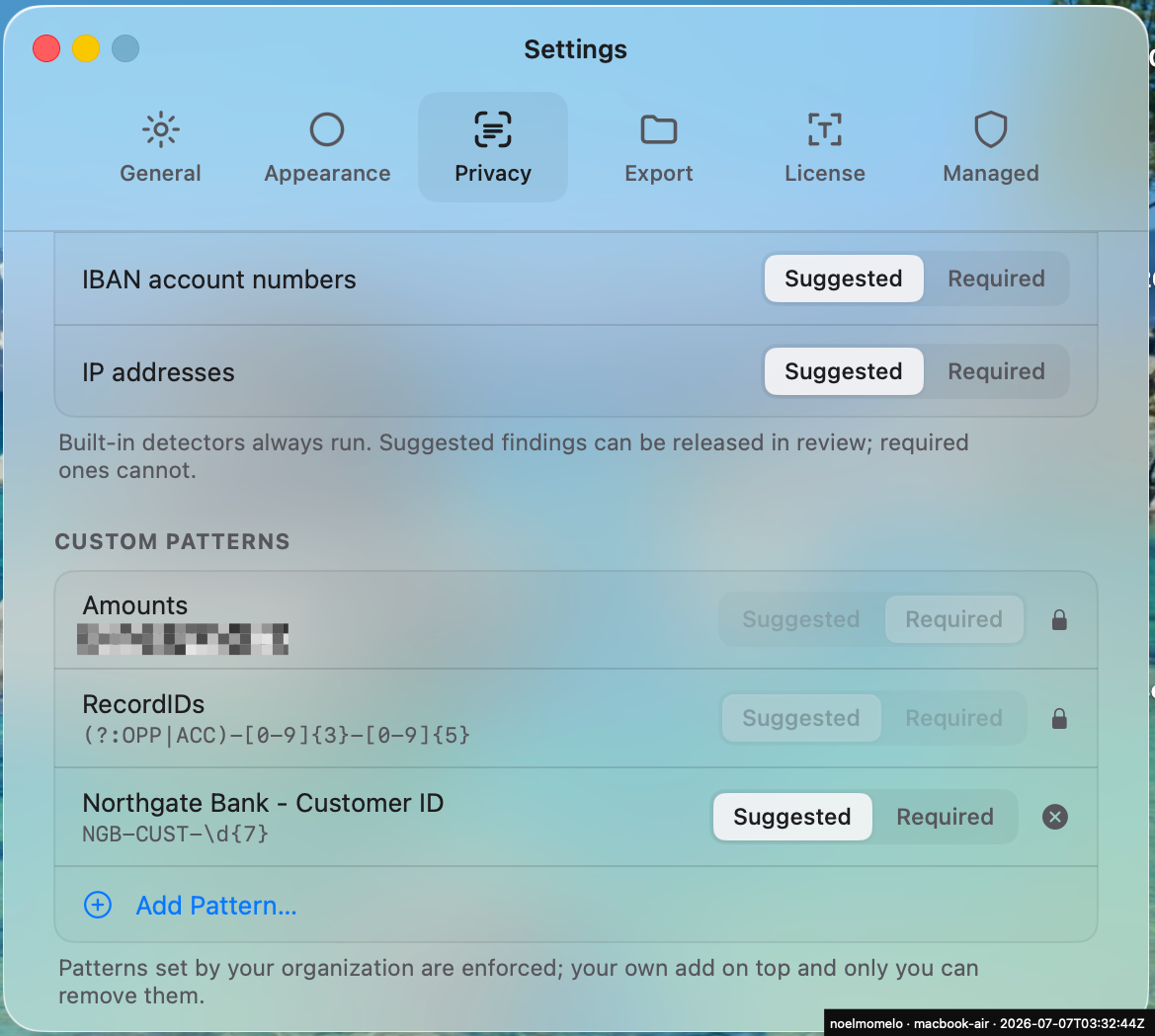
Full key reference: schema.json. Or build a profile interactively with the Profile Creator.
Deployment order
Strictly, order doesn't matter — managed preferences are read live at policy resolution, so a profile that lands after the install still takes effect immediately. Best practice is profiles first, then the PKG: the policy (and license) are already on the device when the app first launches, so it starts governed and licensed from its very first run — no window where a user captures under defaults.
- Managed preferences profile — your org's policy in the
app.screenproofdomain (blocklist, PII patterns, watermark, export destinations, license, updates). - Restrictions profile (optional) —
allowScreenShot=falsedisables native screenshots fleet-wide; Screenproof keeps working. See Screen Recording & native capture. - PPPC deny profile (optional) — denies the Screen Recording TCC service to other named capture apps. Note: no profile can pre-grant Screen Recording to Screenproof — users approve it once. Same page as above.
- PKG — installs
/Applications/Screenproof.appand a per-user LaunchAgent (app.screenproof.agent, starts at each user's next login). Download:https://updates.screenproof.app/Screenproof-latest.pkg. Signed Developer ID Installer (TeamS65X5KY399), notarized.
Console guides
- MosylePKG + custom profile — the tenant these steps were validated on.
- Jamf ProConfiguration Profiles + package policy.
- KandjiCustom Profile + Custom App.
- IntuneCustom template profile + line-of-business PKG.
- AddigyMDM Profiles + Custom Software.
Topics
- Screen Recording permissionWhat MDM can and cannot do about TCC, and how to make Screenproof the only sanctioned capture path.
- Custom PII patternsWrite, test, and deploy your own regex detectors — with copy-paste examples.
- Fleet licensingDeliver the license in-profile with
LicenseKey. - UpdatesSparkle upgrades: silent, prompted, or pinned.
- Profile CreatorBuild a managed-preferences .mobileconfig in the browser.